Cross Listing Agent.
Cross-posts a Yoodlize rental listing to Facebook Marketplace in ~16 seconds.
End of run
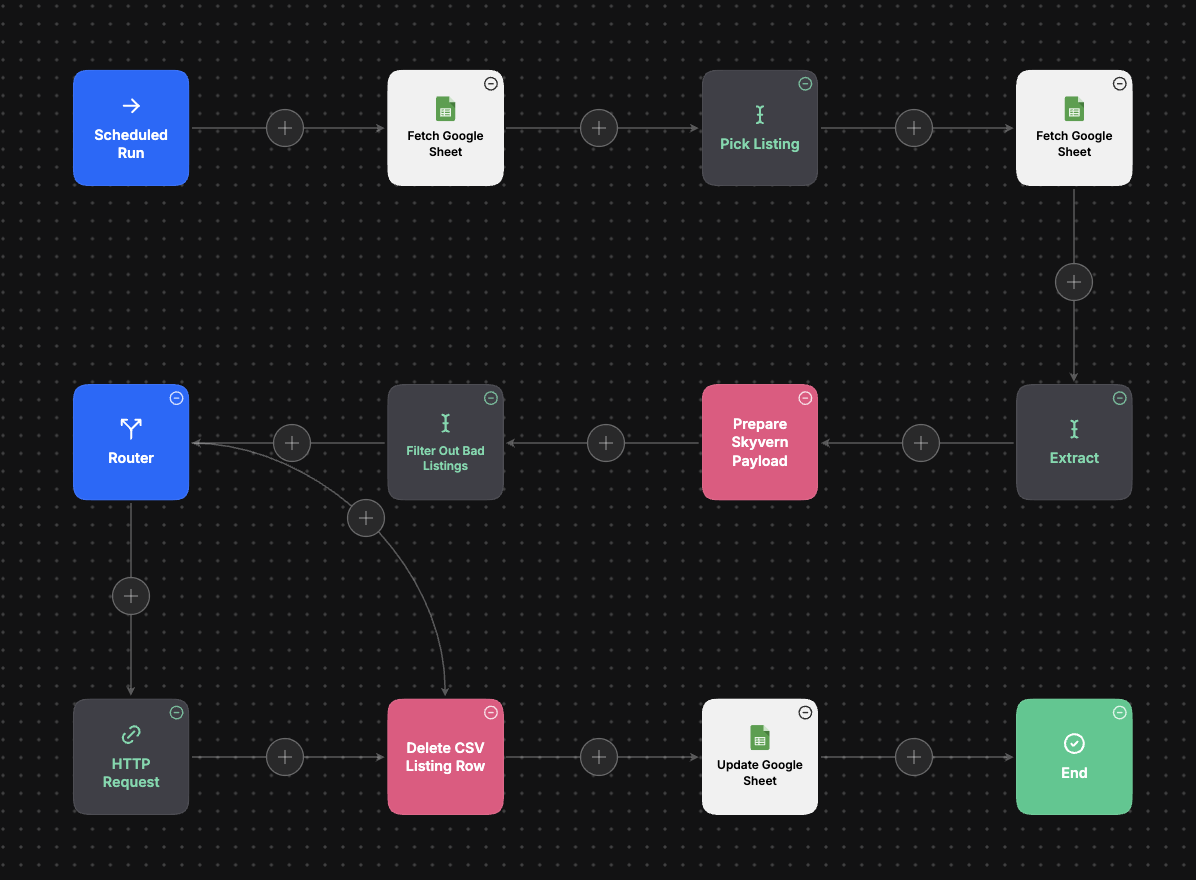
A single Yoodlize rental listing is live on Facebook Marketplace — title, price, description, category, condition, location, and a fully-reconstructed image URL — with the row removed from the queue sheet and a status timestamp written back. The captured run completes in 15.7 seconds from scheduled trigger to “Update Google Sheet.” The listing in that run was a 65 lb breaker hammer from Springville, UT, $100, “Tools & Home Improvement,” cross-posted with one HTTP call.
Challenges it solves
One listing per run, by design. The agent’s system prompt is explicit that packaging and submission are record-scoped, never batched, “to ensure clean separation and traceability of each record.” Each run picks exactly one row from the queue, builds one payload, sends one API call, and dequeues that row. The payoff isn’t theoretical, retries are trivial, rate-limiting is a non-issue, and a Skyvern run that fails takes one listing down with it instead of the batch.
Image URLs are fragments, not URLs. The Yoodlize export ships
partial image references, IDs against a Cloudflare Images backend.
The “Prepare Skyvern Payload” step reconstructs the full URL by
applying the template
(https://imagedelivery.net/<account-hash>/<image-id>/public).
Facebook Marketplace won’t accept a partial path, so this is the
difference between a listing that posts and a listing that 400s.
The hard part isn’t building the payload, it’s staying logged in.
Facebook Marketplace doesn’t have a public posting API; you post by
driving a real browser. Skyvern handles the browser automation, but
logging in on every run would burn captchas and trip suspicion. The
agent hands Skyvern a browser_profile_id, a persistent,
pre-authenticated browser session that survives across runs. One human
login, kept hot indefinitely; a companion refresh agent re-runs the
login and rotates the profile ID only when the saved session expires.
Don’t pay for browser time on garbage data. Before the Skyvern
call, a Claude-backed “Filter Out Bad Listings” node validates the
listing against minimum publication standards and returns
{"approved": true} or false. The Router branches on that, approved
listings hit the Skyvern HTTP request, rejected listings skip the API
call entirely and route straight to “Delete CSV Listing Row.” Bad data
never costs a browser run, which is the line item you actually pay for.
Two sheets, two jobs. The flow does two Google Sheets fetches for a reason. One is the listing queue, the source of truth for what to cross-list next. The other is a config sheet that stores the Skyvern browser profile ID, written by the companion refresh agent (covered below) whenever the session needs rotating. Queue and config kept separate, both re-read on every run.
Inside the Skyvern workflow
The MindStudio side ends with one HTTP request. Everything between that
request and a live Facebook Marketplace post happens inside Skyvern,
which takes the structured payload plus the persistent
browser_profile_id and runs seven sequential blocks against the warm
browser session.
The Skyvern workflow — what actually happens inside the HTTP Request box.
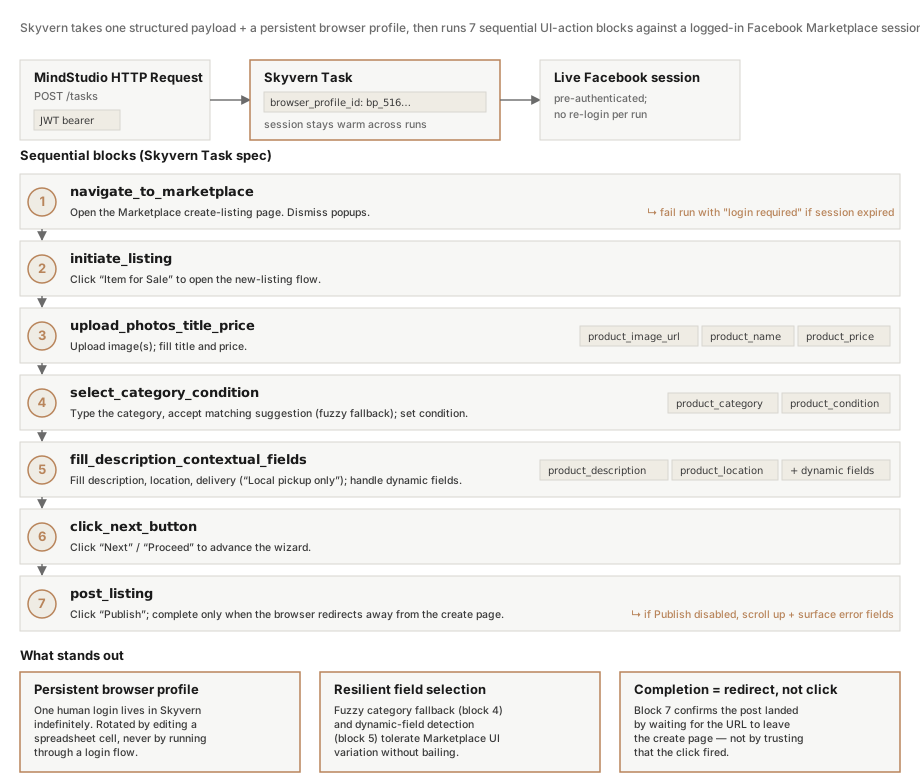
The structure is mostly mechanical, find a field, type a value, scroll, click, but a few decisions make it survive contact with a real, frequently-shifting Marketplace UI.
Fail fast on the things that can’t be recovered. Block 1 dismisses any popup it sees, but if a real login screen comes up, it fails the whole run with “login required.” No retries against a broken session — instead, the failure fires a webhook that wakes a companion refresh agent (covered next), which handles re-login in its own isolated workflow.
Be lenient on the things that can be recovered. Block 4 types
product_category and looks for an exact match, but if Marketplace’s
suggestions don’t have one, it picks the closest similar category
instead of bailing. Block 5 handles dynamic required fields the same
way, if Marketplace surfaces a Device Name or Color field that wasn’t
in the payload, it fills sensible values rather than failing the post.
Completion means landed, not clicked. Block 7’s success criterion isn’t “the Publish button was clicked,” it’s “the browser redirected away from the create-listing page.” If Publish was clicked but the page stays put, the block scrolls up and surfaces the offending form field. That’s the difference between a workflow that reports success on a click event and one that reports success on an actual post.
When the session expires
Login is the riskiest action Facebook scrutinizes — far more than any
individual post — so the design minimizes logins to the absolute
minimum. The main agent doesn’t try to log in; it assumes the
browser_profile_id is still authenticated and fails fast if it
isn’t. When that fail-fast fires, a webhook wakes a separate
MindStudio agent whose only job is the login flow.
The companion FB Refresh Agent — wakes on a webhook, runs a separate Skyvern login workflow, writes the new browser profile back to the config sheet.
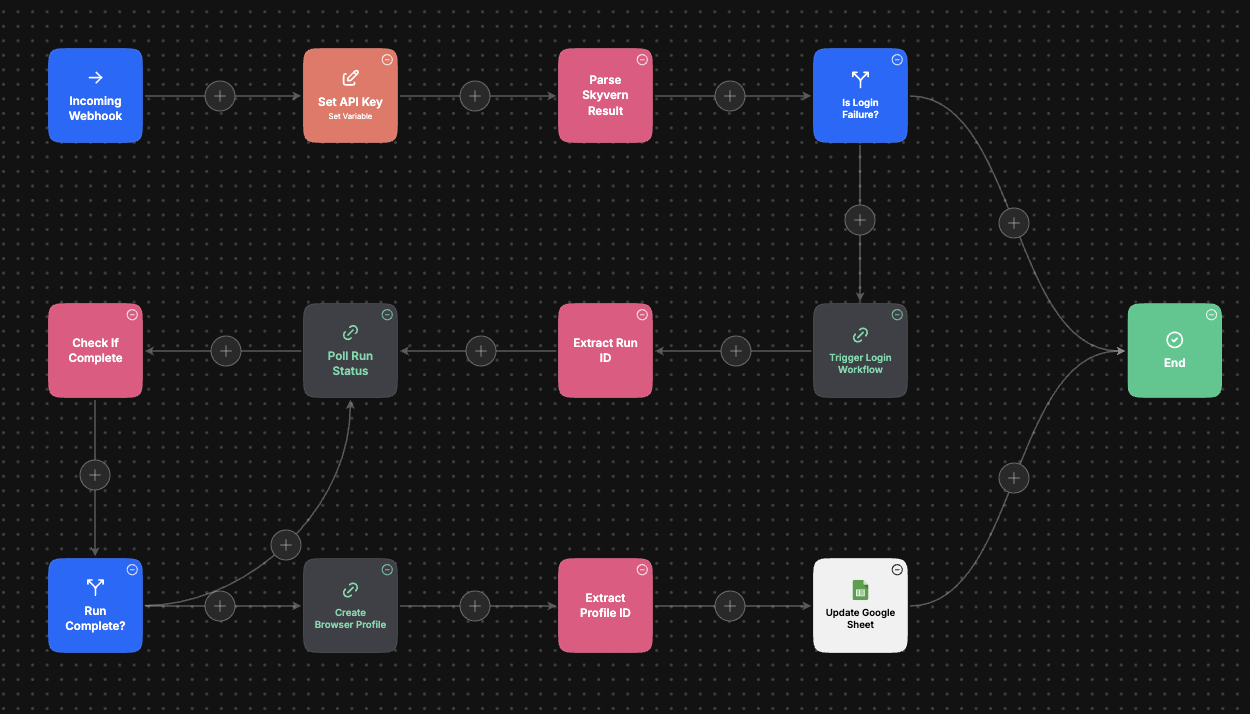
Two agents, one source of truth. The refresh agent doesn’t talk to
the main agent directly. It writes the new browser_profile_id to the
same config sheet the main agent reads on every run. The next
scheduled main run picks up the refreshed profile transparently — no
restart, no coordination, no shared state beyond the spreadsheet.
A different Skyvern workflow, isolated by purpose. The cross-list Skyvern workflow knows how to post listings; it doesn’t know how to log in. The refresh agent calls a separate Skyvern task whose only behavior is authenticating on Facebook and persisting the resulting session as a saved browser profile. Splitting login into its own workflow keeps each task’s surface area small and keeps the highest-risk action gated behind a deliberate trigger rather than running on every cross-list.
Poll, because login is slow. Login is multi-page navigation, sometimes 2FA, sometimes a captcha — measurably longer than a listing post. The refresh agent fires off the Skyvern login task, gets a run ID back, then loops on Poll Run Status → Check If Complete → Run Complete? until Skyvern returns success. Only then does it ask Skyvern to persist the new profile.
The result: as long as the saved profile holds, the cross-list agent keeps posting without ever touching the login flow. When the profile finally goes stale, one failed run triggers exactly one re-login, the new profile ID lands in the config sheet, and the cycle resumes.
When a buyer messages
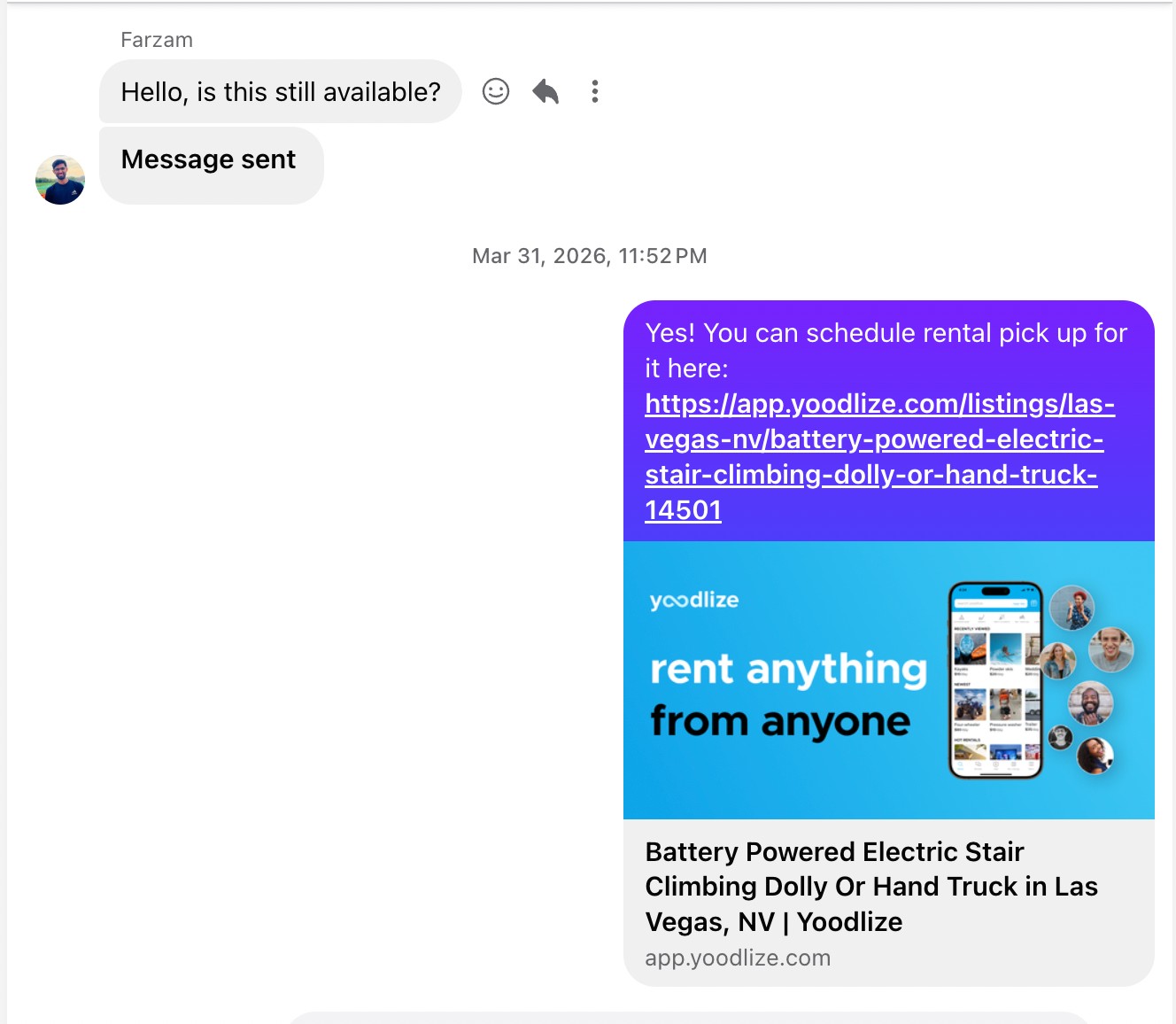
A live Marketplace post is only half the loop. Buyers actually reach out — they ask “is this still available?” by Messenger, not by going to Yoodlize. But the rental itself has to happen on Yoodlize; that’s where the insurance, the scheduling, and the secure payment live. Messenger can’t do any of that.
A second tool wired into the workflow, the FB Auto Reply, handles every inbound message by pulling the buyer back to the matching Yoodlize listing.
Assistant, not owner. The reply tool never speaks as the seller. It positions itself as someone managing inquiries on the seller’s behalf — a small framing distinction that lets it politely deflect questions it has no business answering (price negotiation, the owner’s phone number, deposits) without seeming evasive.
The Listing_ID: line is a contract, not a footer. Every
cross-posted description ends with Listing_ID: {number}. That isn’t
decoration — it’s how the reply tool finds the exact listing the buyer
is asking about. From the ID plus the listing’s city and title, the
tool deterministically rebuilds the canonical Yoodlize URL (lowercase,
hyphens for spaces, strip punctuation, normalize special characters).
Missing or unparseable ID? The tool falls back to the Yoodlize home
page and asks the buyer to search by name — never invents a URL.
Answer one question and exit. The tool only resolves “where do I rent this?” Payment, deposits, schedules, and owner phone numbers are all explicitly out of scope. If a buyer asks why they’re being sent elsewhere, the answer is short and honest: Yoodlize handles insurance, secure payment, and rental scheduling; Marketplace doesn’t.
Under the hood
Eleven steps in MindStudio: Scheduled Run → Fetch Google Sheet (queue) → Pick Listing → Fetch Google Sheet (browser-profile config) → Extract → Prepare Skyvern Payload → Filter Out Bad Listings → Router → HTTP Request (Skyvern) → Delete CSV Listing Row → Update Google Sheet → End. Claude runs the three LLM-touchpoints, Pick Listing, Extract,
and the validation gate. Prepare Skyvern Payload and Delete CSV
Listing Row are deterministic JavaScript. The whole thing fans out to
one Skyvern HTTP call (JWT bearer auth) and two Google Sheets writes
per listing. Total wall time on the captured run: 15.7 seconds. Two
companion pieces sit alongside the main flow and handle the parts it
deliberately doesn’t: the FB Refresh Agent for session re-auth, and the
FB Auto Reply tool for inbound Messenger inquiries.
Example output, a real cross-post the agent put on Facebook Marketplace.
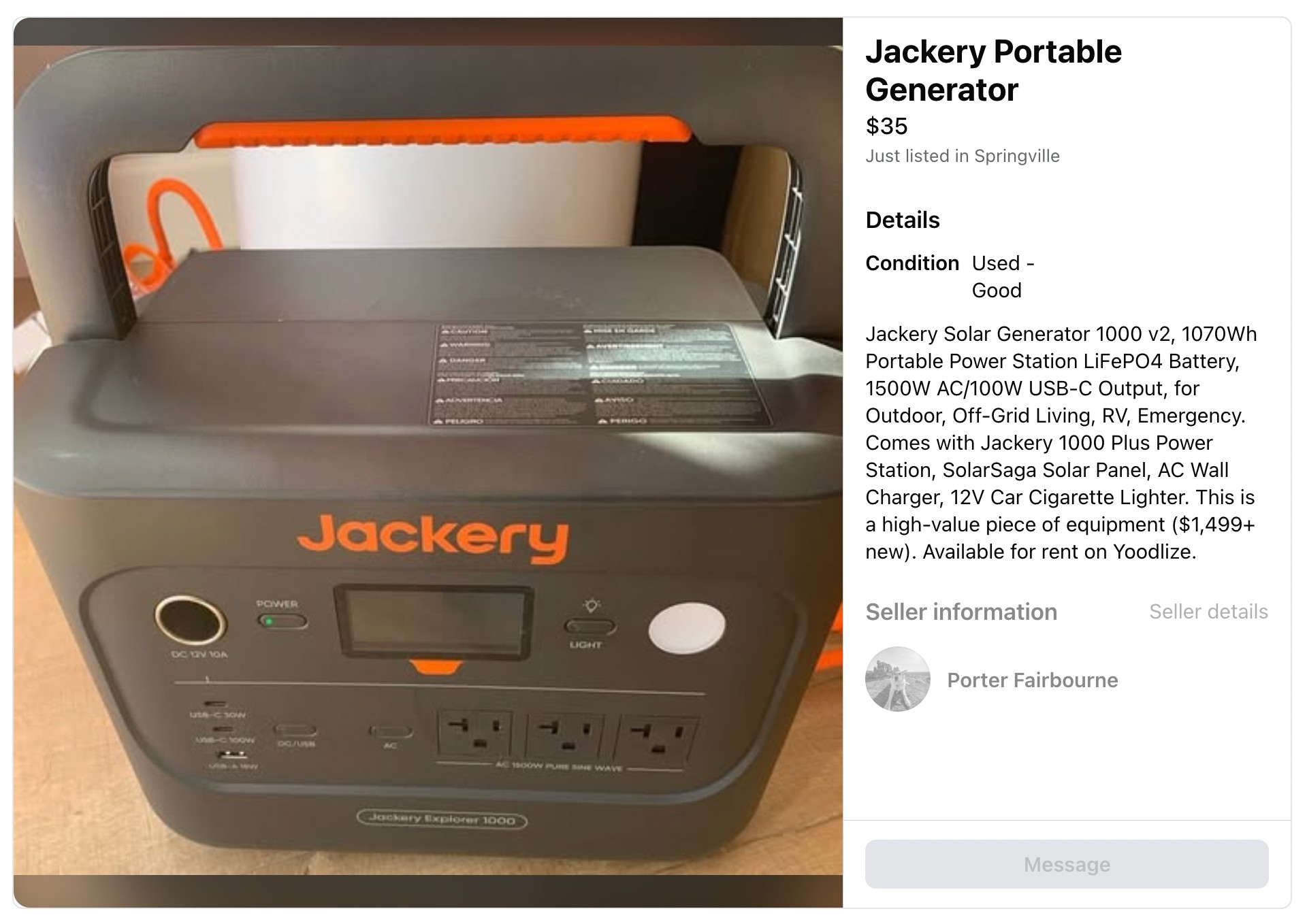
And what happens next — the FB Auto Reply tool answering a buyer’s Messenger inquiry with a Yoodlize URL it built from the Listing_ID.