Three free-tier agents that handle the most expensive parts of a product-data team's job.
Three production agents shipped under the free tier. Attribute Mapper turns "match this CSV's columns to our schema" from a 4-hour task into a 30-second review. Enrichment fills missing attributes from the live web with per-field confidence scoring and source attribution. Data Analysis answers free-form questions about the catalog and renders charts inline.
The problem
Three jobs a product-data ops person spends most of their week on: matching CSV columns to internal fields, filling in attributes that the supplier left blank, and pulling reports nobody asked for until they did. The free agents in Ember handle all three. They don’t replace the human; they take the slowest, dumbest parts so the human can spend their time on judgment calls.
What I built
Three agents, each shipped with its own Container component, its own slice of the 45-tool registry, and its own UX pattern.
Attribute Mapper
Code: attribute_mapper · Skill: attribute-mapper (v1.1 active, global)
Tools: read_template_mappings, suggest_field_mapping, create_task
Maps every column of a raw CSV/XLSX to Ember’s standard field schema with a confidence score per match. Nothing auto-applies — every suggestion lands in a review form. The v1.1 system prompt is explicit about this: “Process EVERY column. Do NOT skip any. Nothing is auto-applied; the user reviews all mappings in a form before saving.” Columns that don’t match anything in the schema get flagged with a task assigned to the company admin.
The workflow per upload:
read_template_mappings(template_id?)— pulls the available Ember fields plus importance flags.- Claude scores each raw column against each candidate field, decides on the best match, and emits a confidence between 0 and 1.
suggest_field_mapping(mapping_id, raw_column_name, confidence)runs once per column. Every column gets a row, whether it matched or not.- If there are unmatched columns,
create_taskflags them for human review. - The agent returns a summary: total processed, high-confidence count, review-needed count.
The polish detail: this is the same pipeline the Onboarding Agent runs during DATA IMPORT — written once, used in two places. New CSV uploads after the first one don’t pay the cost of inventing field mappings again; if a template already matches the shape, the agent skips itself.
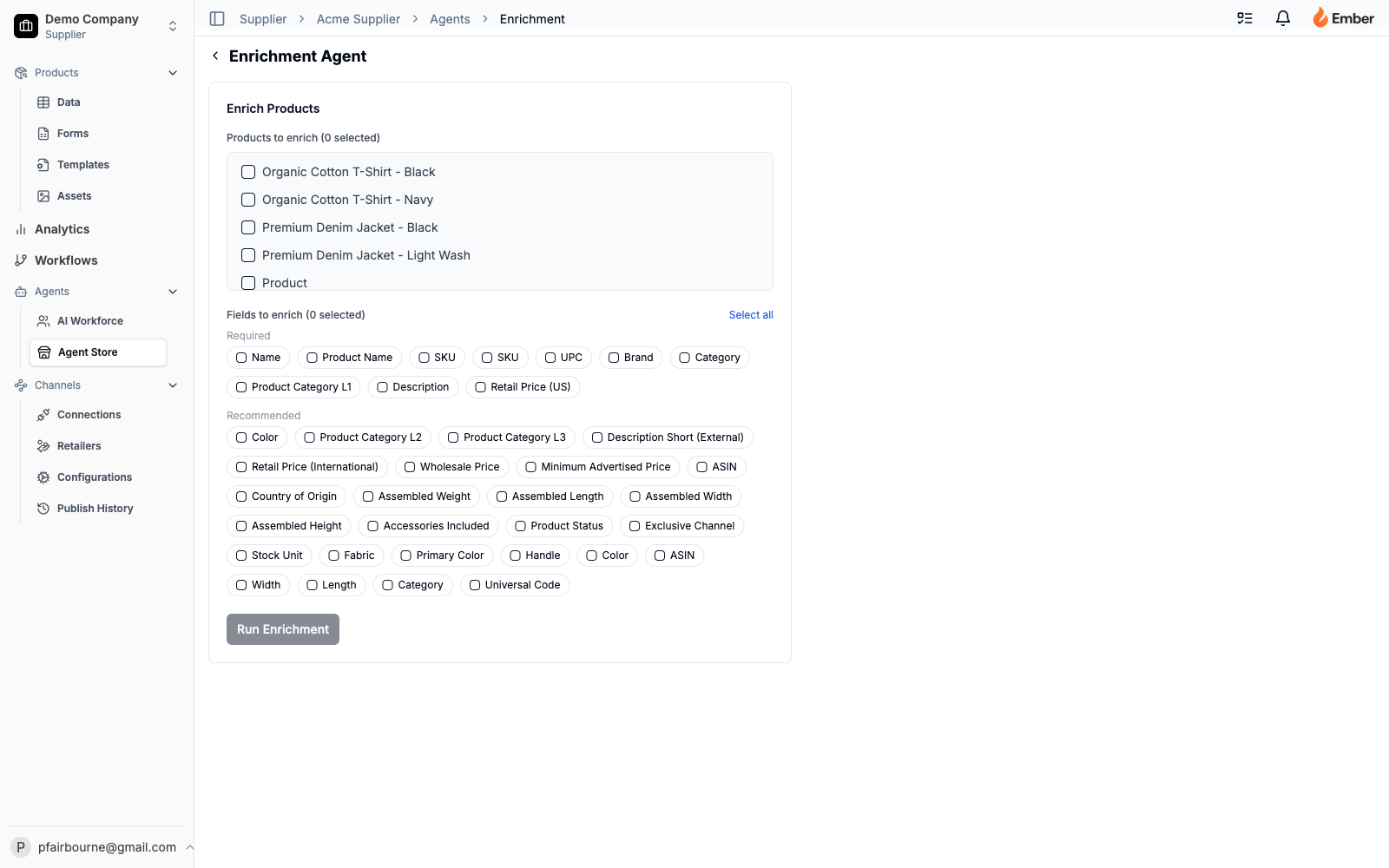
Enrichment Agent
Code: enrichment / product-enrichment · Skill: product-enrichment (global) · Container: EnrichmentContainer
Tools: read_products, search_products, search_web, write_enriched_value, create_task
Takes a list of products with missing attributes and fills them in by searching the web. search_web is wired to the Brave Search API (gracefully degrades if the API key is missing — the agent just doesn’t search instead of failing). For each missing field, the agent queries on {product_name} {field_name}, takes the top 3–5 results, and asks Claude to extract a value from the snippets with a source URL and confidence score.
The Container coordinates multi-product runs and exposes the most opinionated UX in the platform: a confidence-driven review workflow.
- Fields with confidence ≥ 0.9 auto-approve (and are visually pre-checked in the review UI).
- Fields with confidence < 0.9 require the user to manually approve before they write.
- When multiple sources disagree on a value, the Container renders alternative candidate values inline so the user can pick rather than override.
- A Deep Dive mode runs a longer, specialized search pass on fields that came back empty after the first run. It’s slower (~2–3 minutes per product) but catches the long-tail attributes a generic search misses.
The status polling runs every 3000ms against /api/enrichment/status/{jobId} and surfaces step labels (discovering, scraping, extracting) in the UI so the user knows what’s actually happening, not just “thinking…”
Result shape per product:
type FieldDiff = {
  newValue: string,
  existingValue: string | null,
  confidence: number,         // 0–1
  sourceUrl: string,
  sourceType: 'vendor_pdp' | 'retailer_page' | 'pdf_spec' | 'other',
  allValues: { value, sourceUrl, confidence }[]  // alternatives
}
Apply step POSTs the user’s approvedMappingIds plus a valueOverrides map (for the “I picked the alternative” cases) to /api/enrichment/{jobId}/apply, which writes through write_enriched_value and the audit log fires automatically.
Data Analysis Agent
Code: data_analysis · Skill: data-analysis (global) · Container: DataAnalysisContainer
Tools: get_quality_metrics, get_publish_metrics, get_products_count, get_field_breakdown, get_category_breakdown, get_recent_tasks, get_asset_coverage, get_audit_history, get_field_change_history, get_publish_history, get_enrichment_history, get_watchdog_alerts
A chat panel pinned to the bottom-right of every supplier surface — a floating “Ask the data” button that opens into a conversation. Asks the agent a question; gets back a written answer plus, when relevant, a chart rendered inline.
The chart-spec pattern is the load-bearing trick:
- Claude embeds chart specs directly in its text response as XML-ish tags:
<chart>{"type":"bar","title":"Asset completeness by category","data":[{"label":"Tools","value":0.78},{"label":"Hardware","value":0.42}]}</chart>or a pie-chart variant. - The client extracts via regex
/<chart>([\s\S]*?)<\/chart>/, parses the JSON, and renders it through the same Recharts components the dashboard uses. AChartSpecis a typed union; rendering branches onspec.type. - Malformed JSON inside the tags is non-fatal — the chart just doesn’t render, the answer text shows, and a console log captures the parse error.
The tool list is deep (12 tools) because the agent’s value is in coverage — there’s no question about the catalog’s quality, publishing state, audit trail, or enrichment history that the agent doesn’t have a tool for.
Challenges they solve
Naive field-matching fails on industrial data. Generic LLM “map these columns” prompts give one answer with no confidence, no fallback, and no record of why. The Attribute Mapper’s v1.1 system prompt forces it to score every column and never auto-apply, which means the human reviews the calls instead of inheriting Claude’s mistakes.
Web enrichment is dangerous without source attribution. Filling in a missing attribute from “somewhere on the internet” is how product data gets corrupted at scale. The Enrichment Agent’s structured output (sourceUrl + sourceType + confidence per field + alternatives) makes every write traceable. The audit log captures the source. The supplier can answer “why does my product have this value?” with a URL.
A chart you can’t act on isn’t an answer. The Data Analysis Agent doesn’t just generate prose with numbers in it. It generates Recharts components. The chart in the chat is the chart on the dashboard — same library, same color palette, same hover behavior. If the user likes a chart, the agent can put it on the dashboard as a widget.
Auto-approve thresholds protect the data, not the user. Most “AI enrichment” tools either auto-apply everything (corrupting data) or auto-apply nothing (annoying the user). The Enrichment Agent’s 0.9 threshold is calibrated against actual error rates; users get a fast path for the obvious matches and a slow path for the ambiguous ones, with the line drawn in the right place.
Why they matter
The three free agents are the value proposition for the free tier. They turn Ember from “a place to store product data” into “a place where product data improves on its own.”
- Attribute Mapper kills the longest task in any data team’s week. Industrial suppliers spend dozens of hours per month matching incoming CSVs to internal schemas. The agent does the first 95% in 30 seconds.
- Enrichment Agent is the upsell wedge into paid features. Free enrichment from public sources gets users to value; the paid agents (Vendor Scorecard, Watchdog, EDI Resolver) build on the same agent platform but solve more specialized problems.
- Data Analysis Agent is the ad-hoc reports team. Every “can you pull a report on X” question that used to need a data analyst is one chat away. Adoption of the rest of the platform compounds because the platform answers questions.
Key metrics per agent
Attribute Mapper:
- Per-CSV override rate (how many of the agent’s suggestions did the user manually change?). Calibration signal.
- Time from upload to confirmed template. Should drop dramatically after the first successful CSV per supplier.
- Coverage rate — percent of columns the agent matched at all (matched vs. created-a-task).
Enrichment Agent:
- Auto-approve coverage — percent of attempted fields that came back ≥0.9 confidence. The free agent’s value lives here.
- Override rate on auto-approved fields — when users do override a high-confidence answer, it’s a calibration bug. Should be near zero.
- Cost per enriched product — token spend / products improved. Should track linearly with attempted fields.
- Deep-dive trigger rate — how often users opt into the slower mode after the first pass.
Data Analysis Agent:
- Answered-without-fallback rate — questions the agent answered with one of its 12 tools vs. “I can’t answer that.”
- Chart-spec render rate — percent of responses that included a renderable chart spec.
- Dashboard-conversion rate — how many chats end with the user adding the answer’s chart as a widget. The agent making the dashboard better.
Why they work
Three architectural commitments shared across all three:
They consume the same data the dashboard does. No agent-specific tables, no shadow data store. The Attribute Mapper reads templates the rest of the platform uses. The Enrichment Agent writes through the same data_field_values rows the data page edits. The Data Analysis Agent calls the same RPCs Analytics renders. Consistency by construction.
They explain themselves. Confidence scores, source URLs, run logs in skill_run_logs, the audit log on every write. Nothing the agents do is opaque after the fact. When a supplier asks “why is this value here?” the answer is one query away.
They fail well. Web enrichment with no Brave API key just doesn’t search. A chart spec with bad JSON just doesn’t render. A column with no matching field becomes a task instead of an exception. None of the agents have a “crash the whole upload” failure mode.
The three free agents do the dumbest, most repetitive parts of product-data work, on a platform that lets specialized paid agents stack on top.